
Opt-In Email Notifications for 90% Credit Usage
If you're on an hourly package, you can now enable automated email reminders when your credit hours reach 90% usage. This helps ensure you stay informed and avoid any service interruptions.
How to Enable Credit Usage Email Notifications
You can turn on notifications directly from your Flow Digital project dashboard:
- Log In to the Client Portal
-
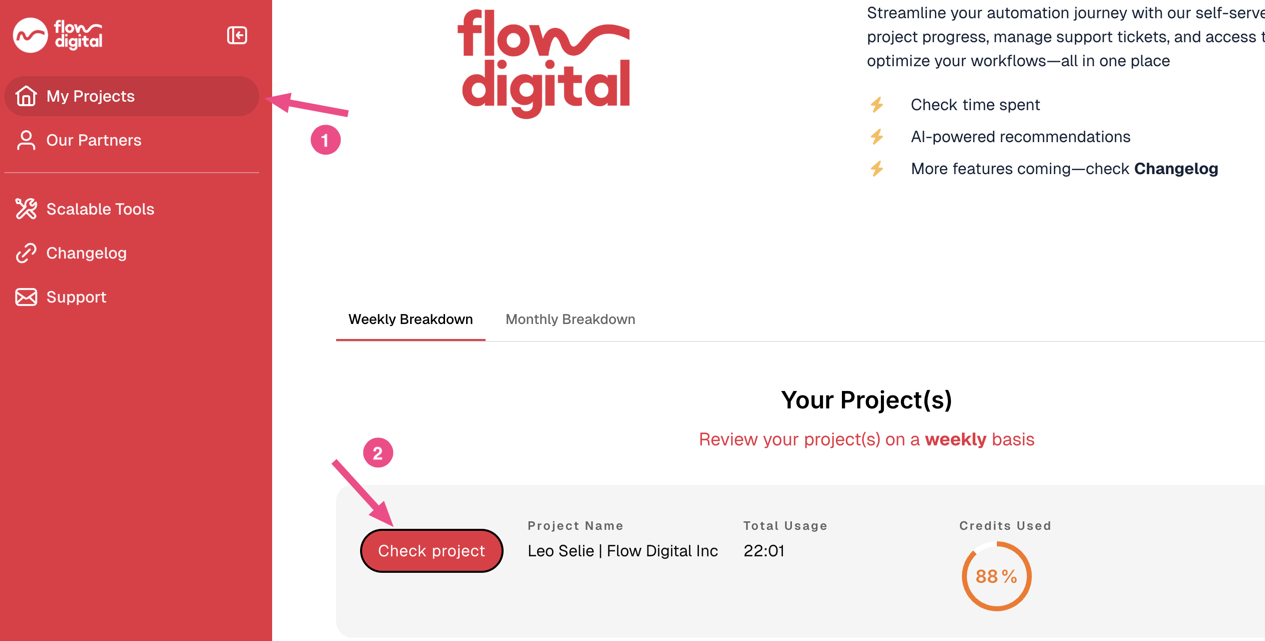
On your dashboard, locate the My Project section and click Check Project.
-
Open your project in the dashboard, click the three-dot menu (⋮) beside the Top Up option and select Enable email.

- Once enabled, you’ll automatically receive an alert when your credit usage goes above 90%.
What You’ll Receive
When this feature is enabled, you’ll receive an email from support@flow.digital informing you that your credit hours have exceeded 90% of your package. This helps you plan ahead and avoid any disruptions in your project.
Related Articles:
- How to Register in the Client Portal
- I’m Trying to Login to the Client Portal, But I’m Not Receiving Any Codes
- Need Help? Here’s How to Contact Flow Digital
- How to Top Up or Purchase Additional Hours
- How to Book a Meeting with Your Project Lead (For Existing Clients)
- My client portal
- How to Check Your Remaining Credits or Time in the Client Portal
- How to Find Your Project Lead (For Existing Clients)
- How to Access Your Meeting Recordings in the Client Portal
- Can I Use Multiple Accounts to Access the Client Portal?